

You don’t realize how much your chair affects your body until your back starts aching or your shoulders feel stiff. An ergonomic chair is designed to support your body, reduce strain, and keep you comfortable even during long sitting hours.
Whether you work from home, game, or study, the right chair can make a noticeable difference in posture, focus, and overall well-being.
Let’s break down what makes a chair truly ergonomic and why it matters.
What Is an Ergonomic Chair?
A truly ergonomic chair is built to fit your body, not the other way around. Instead of forcing you into an unnatural position, it supports your spine, shoulders, and hips while adapting to your movements.
- Supports your natural spinal curve
- Adjusts for height, tilt, and arm position
- Reduces strain on shoulders, neck, and lower back
The goal is simple: keep you comfortable, allow blood to flow freely, and prevent posture-related pain. A good ergonomic chair works with you, not against you, so you can focus without constant shifting or discomfort.
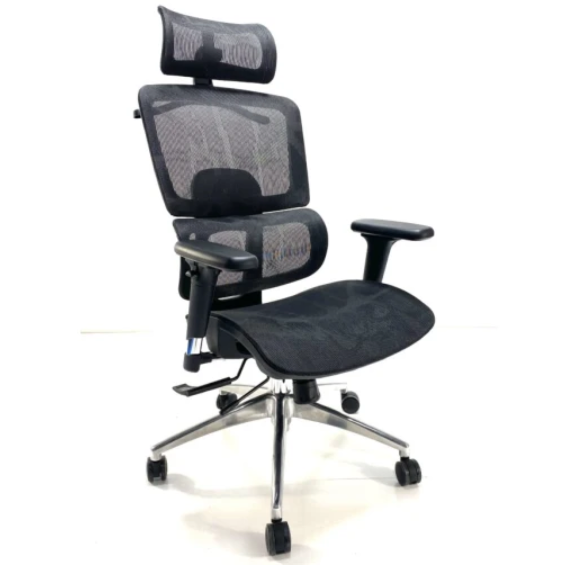
What Are the Features of an Ergonomic Chair
1. Adjustable Seat Height
A chair with adjustable height ensures your feet rest flat on the floor and knees form a 90° angle. This prevents dangling legs or uneven weight distribution, which can lead to discomfort or circulation problems.
Tip: Ideal seat height ranges from 16 to 21 inches from the floor depending on your desk and body height.
2. Lumbar Support
Proper lower back support is crucial for maintaining your natural spinal curve. Adjustable lumbar support helps prevent slouching and reduces the risk of chronic back pain.
Tip: Look for chairs with an S-shaped backrest or adjustable lumbar pads.
Explore our Eames Management Mesh Office Chair that provides a complete experience of an ergonomic chair.
3. Seat Depth and Cushioning
Your thighs should be fully supported without pressure behind the knees. A cushioned seat that doesn’t flatten over time makes long sitting sessions more comfortable.
Tip: 2–4 inches of space between the back of your knees and the seat edge is ideal.
4. Backrest Tilt and Recline
Being able to tilt and lock your chair helps you stretch and adjust your posture. Reclining slightly relieves pressure on your spine and allows muscle relaxation.
Tip: A tilt range up to 135° is sufficient for office or home use.
5. Adjustable Armrests
Armrests should support your arms at a 90° angle to prevent shoulder and wrist strain. Look for 2D, 3D, or 4D armrests depending on how much adjustability you need.
Tip: Arms should rest gently without lifting or sagging while typing.
6. Breathable Backrest Material
Mesh or ventilated materials allow airflow and prevent sweating. A spine-shaped backrest combined with an adjustable headrest adds comfort for long hours.
Tip: Breathable mesh is ideal for hot climates or extended workdays.
7. Swivel Base and Wheels
A sturdy wheelbase and smooth casters let you move around your workspace without twisting your spine. Swivel capability allows easy reach without strain.
Tip: Check for durable materials and 360° rotation.
Why Should You Care About Ergonomics?
Ignoring ergonomics can lead to pain, fatigue, and long-term posture issues. A well-designed chair:
- Reduces muscle strain and discomfort
- Promotes proper posture and spinal alignment
- Boosts focus and energy throughout the day
- Prevents long-term musculoskeletal problems
- Protects your productivity and health
Investing in an ergonomic chair isn’t just about comfort; it’s about supporting your body and protecting your health for years to come.
Nectar Home Decor Chairs That Get Ergonomics Right
At Nectar Home Decor, we focus on chairs that combine style, comfort, and ergonomic support. Our designs consider both aesthetics and your body’s needs:
- Adjustable seating and lumbar support for personalized comfort
- Breathable materials and supportive cushioning for all-day use
- Swivel and recline features for flexibility in home offices or living spaces
Explore our collection of ergonomic chairs and find one that fits your home, your body, and your lifestyle.
FAQs
Do all adjustable chairs qualify as ergonomic?
Not necessarily. True ergonomic chairs support posture, reduce strain, and adapt to your body’s movements, not just offer height adjustments.
How long should you sit, even in an ergonomic chair?
Even the best chair cannot replace movement. Stand up or stretch every 45–60 minutes to prevent stiffness.
Are ergonomic chairs only for office use?
No, they work for studying, gaming, long calls, or any activity that involves prolonged sitting.
Is an ergonomic chair worth the investment?
Yes. If you sit more than 4–6 hours a day, a well-designed chair improves health, comfort, and focus, which far outweighs the cost.